Wednesday, August 29, 2018 by Nate Bross
Someone asked on Stack Overflow:
I have a test that uses some Base64 encoded strings as parameters to a method. The test runs and passes (or fails if I modify the method to a failed state). The point is that the test framework executes as expected.
When I try to debug the test through Visual Studio (or VSCode) the debugger starts, loads symbols, and then exits with my test case showing a passing state. No Breakpoints are hit.
I only identified this large string by trial an error, removing one test case at a time until I was able to successfully hit breakpoints.
This method reproduces the problem. Even though its not used, comment out b64 and you should be able to hit breakpoints through the debugger, uncomment it and breakpoints fail.
This happens with xunit 2.3.1 and 2.4.0; not sure if its even an xuint thing, but I’m trying to figure out what I can do to debug this method.
Run dotnet new xunit and drop this test in: https://gist.github.com/fuzzzerd/8347a8609fd1ccabdfaeea564d42a976 (snip is too large for question body)
I posted the following answer, which was chosen as the accepted answer:
Looks like I’m running into this issue: https://github.com/dotnet/roslyn/issues/20118. There’s no work around posted, but loading from a file does successfully work around this issue.
Originally posted on Stack Overflow — 0 upvotes (accepted answer). Licensed under CC BY-SA.
Monday, August 13, 2018 by Nate Bross
Someone asked on Stack Overflow:
I am trying to learn ASP.Net Web API. And I have a MVC controller Home and from there I want to make a call to API Controller which is CoursesController via ajax call. But I am not able to make the ajax call to the api controller when I give the complete valid path.
Case 1: Working example: If I go to localhost:port/
q. HomeController’s Index mathod gets hit
b. Then CoursesApiController gets hit and result is displayed
Case 2: Non Working Example: If I go to localhost:port/Home/Index
a. HomeController’s Index method gets hit
b. But ApiController does not get hit
Chrome Dev error:
It tries to attempt to open API URI pointing at localhost:port/Home/api/Courses (which obviously is wrong).
But why does it work fine when I don’t explicitly tell the URL in browser?
Routes.Config File:
  routes.MapRoute(
                name: "Default",
                url: "{controller}/{action}/{id}",
                defaults: new { controller = "Home", action = "Index", id = UrlParameter.Optional }
            );
WebApi.config File:
   config.Routes.MapHttpRoute(
                name: "DefaultApi",
                routeTemplate: "api/{controller}/{id}",
                defaults: new { id = RouteParameter.Optional }
            );
Index.cshtml File:
<div >
    hello worl
    <ol id="courses"></ol>
</div>
@section scripts
{
    <script>
        $.ajax({
            url: 'api/courses', // here I am making the API Call to Courses controller
            success: function (courses) {
                debugger;
                var list = $('#courses');
                for (var i = 0; i < courses.length; i++)
                {
                    var course = courses[i];
                    list.append('<li>' + course.title + '</li>');
                }
            }
        });
    </script>
}
I posted the following answer, which was chosen as the accepted answer and received 2 upvotes:
You have a bug/typo in your url in the javascript.
You have: url: 'api/courses',
Should be: url: '/api/courses',
This is due to how the browser handles relative paths.
If your browser is sitting at http://localhost:port/ the script will work since the relative path is correct. Once you manually route to /home or /home/index the relative path is now pointing to /home/index/api which isn’t what you want.
Ultimately a javascript path fragment that does not start with a ‘/’ is treated as relative to the current browser path. A path that starts with a ‘/’ is treated as an absolute path.
Originally posted on Stack Overflow — 2 upvotes (accepted answer). Licensed under CC BY-SA.
Thursday, May 3, 2018 by Nate Bross
I operate a couple niche open source projects. They don’t generate much activity, but they’ve been useful to me over the years so I share them with the world to help anyone else that happens upon them.
They’re hosted on my GitHub page. Which is great for sharing the source code and allowing folks to submit issues and submit pull requests (not that my projects are big enough to get any real activity, but I can hope). There isn’t a good way to share the binary output from GitHub. You need to utilize additional tools and software. I’m using AppVeyor and MyGet and I outline my configuration below.
The full CI setup could be achieved with MyGet alone since they also offer build services; but I’m using a combination of MyGet (pre-release package hosting and AppVeyor for builds).
AppVeyor Setup
In order to get my .NET Standard 2.0 library to build in AppVeyor I had to make a few changes from the default configuration.
Build Setup
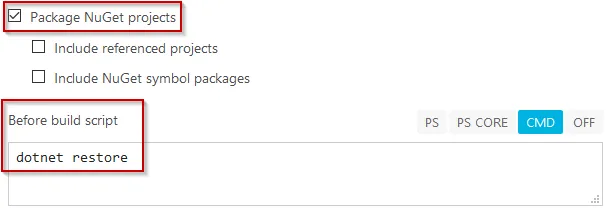
On the build configuration tab you need to tick the box to build Nuget Packages, and most importantly add a pre-build script to perform
dotnet restore
Deployment Setup
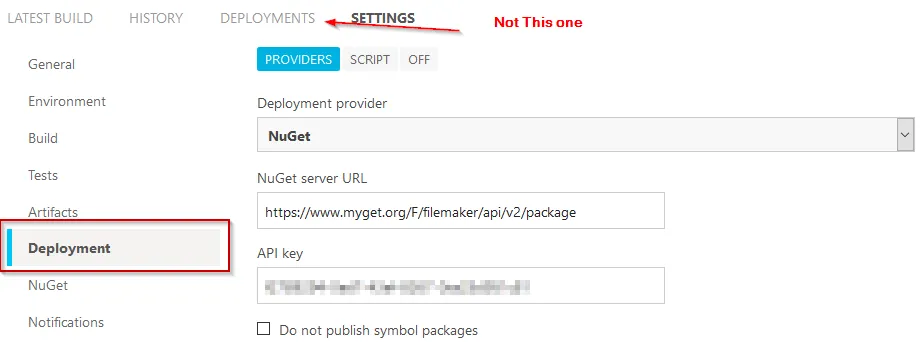
On the Settings >> Deployment tab, in order to push to MyGet you will need to provide the MyGet Feed Url and API key. Both of these are easy to obtain on your feeds detail page.
MyGet
There are plenty of resources for setting up a MyGet feed, so I’m not going into those details, but this is where you get the settings utilized in AppVeyor:
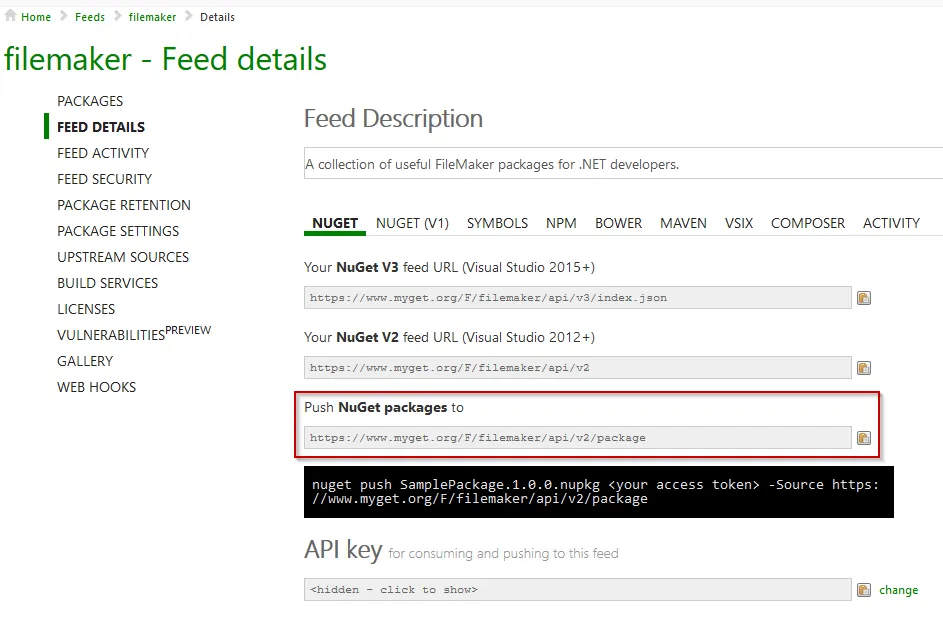
The last step is pushing the MyGet packages up to Nuget; which can be done directly through the MyGet interface. Right now, this is a manual process for me. I have two separate AppVeyor builds setup for the same project, pushing to the same MyGet feed. One connected to the develop branch and one linked to master. Within AppVeyor I have enabled assembly version patching so they all end up in the MyGet feed and I can push the master releases out to Nuget.
I’m looking into having the build create release tags in the repository after a successful build, but haven’t figured out how I want that to work yet.
Tuesday, February 13, 2018 by Nate Bross
Someone asked on Stack Overflow:
We want to set tracking cookie to check how many users we are getting through various marketing campaigns. On each campaign URL of our website, we add following query string parameters:- utm_source, utm_medium and utm_campaign.
Sample URL:- https://example.com/?utm_source=facebook&utm_medium=cpc&utm_campaign=jan
Anytime, we get request from any URL on our server, we check:
- If url has utm_* parameters, we save those in the cookie.
- If there’s no such utm_* parameters in the url and If referer host is our website i.e. https://example.com/, we save that in cookie for 6 months.
- If there’s no such utm_* parameters in the url and referer is one of search engine, we save search engine name in cookie.
and we have few more similar conditions.
Should we write this logic on server side (C#) OR Client side(javascript)?
I posted the following answer, which was chosen as the accepted answer and received 1 upvote:
Technically you can do it on either end; but in reality, you might have slightly better luck with a server side approach as it will be harder for browsers to get around (either they accept cookies or not). Things like noscript and adblockers could interfere with a client side implementation.
Additionally, if you do things server side, you could store that information along with a thumb print of the browser in a database and compare against that for future visits. That would work even if cookies are being blocked/cleared.
Originally posted on Stack Overflow — 1 upvotes (accepted answer). Licensed under CC BY-SA.
Friday, February 9, 2018 by Nate Bross
Someone asked on Stack Overflow:
The primary key of my table is an Identity column of an ID. I want to be able to insert a new row and have it know what the last ID in the table currently is and add one to it. I know I can use Scope Identity to get the last inserted column from my code, but I am worried about people manually adding entries in the database, because they do this quite often. Is there a way I can look at the last ID in the table and not just the last ID my code inserted?
I posted the following answer, which was chosen as the accepted answer and received 2 upvotes:
With a SQL Identity column, you don’t need to do anything special. This is the default behavior. SQL Server will handle making sure you don’t have collisions regardless of where the inserts come from.
The @@Identity will pull the latest identity, and scope_identity will grab the identity from the current scope.
A scope is a module: a stored procedure, trigger, function, or batch. Therefore, if two statements are in the same stored procedure, function, or batch, they are in the same scope.
Originally posted on Stack Overflow — 2 upvotes (accepted answer). Licensed under CC BY-SA.
Wednesday, February 7, 2018 by Nate Bross
Someone asked on Stack Overflow:
This is my connection string for my azure database:
Server=tcp:linkofy.database.windows.net,1433;Initial Catalog=Linkofy;Persist Security Info=False;User ID={your_username};Password={your_password};MultipleActiveResultSets=False;Encrypt=True;TrustServerCertificate=False;Connection Timeout=30;
my .NET database connection string is:
Data Source=|DataDirectory|Linkofy-Release.sdf
In the Package/Publish SQL do I just add my azure connection string to the destination database with my username and password, will this upload my database to azure?
What would my web.config transformation connection string then be?
I posted the following answer, which was chosen as the accepted answer and received 1 upvote:
I would get the database up to Azure myself. I recommend you look into the Data Migration Assistant.
Once on Azure, you can use the Azure App service App Settings to specify the connection string your application should use instead of web.config transformations.
Notable comments
Nate (0 upvotes): @Lucie No problem. Good luck.
Originally posted on Stack Overflow — 1 upvotes (accepted answer). Licensed under CC BY-SA.
Monday, February 5, 2018 by Nate Bross
Someone asked on Stack Overflow:
How to create a web application in ASP .net with VB which should accept HTTP request from users in JSON format (Sender should be able to send it in JSON format) and send response code as 200 OK once we received data. Whenever someone sends JSON data web service should send a response.
I posted the following answer, which was chosen as the accepted answer:
I’d recommend you look into ASP.NET Web API. This link is C#, but it is similar for Visual Basic.
You need to create a controller with an action that accepts the JSON data you anticipate.
Something like this should work:
Public Function GetProduct(ByVal input As YourInputObject) As IHttpActionResult
    'process your input
    Console.WriteLine(input.ToString()) ' or similar

    Return Ok(product) ' HTTP 200
End Function
You can use a tool like Postman to test that its working how you expect.
Notable comments
Nate (0 upvotes): @Rameez you can check the documentation for WebAPI, you can use these controller actions to accept GET, PUT, POST, and any other HTTP verb you can dream up. The basic structure should be like what I have here.
Originally posted on Stack Overflow — 0 upvotes (accepted answer). Licensed under CC BY-SA.
Monday, February 5, 2018 by Nate Bross
Someone asked on Stack Overflow:
Basically I’ve created a project in ASP and AngularJs to grab image/video data from a folder and display it on a webpage in full screen, like a slider. The data sits in a folder, with a specific naming convention that gets trimmed to make up the slide interval and start/end date.
Example:
*10000*_*2018-02-05*,*2018-02-12*~backgroundVideo.mp4 <br/>
10 Second slide, Start 02/05/2018 and End 02/12/2018.
The app works great. On initial startup of the web app a loading bar appears, loads all the image data first and then begins showing the content.
My question:
I need to figure out the best way to load new data on the fly while images are being displayed. Technically, I need to figure out a way to check for new content/change and load it in the background while images are being displayed (I’m going to assume AJAX calls will get this to work). I want the loading bar to only be there on start up, not when new content gets loaded in.
The HTML:
<body ng-controller="SlideCtrl" style="background-color: #1f567c;">


<div class="col-xs-12" height="100%" ng-if="progress !== 100">
    <progressbar class="progress-striped progress-bar-warning" value="progress">{{progress | number:0}}%</progressbar>
</div>
<embed ng-show="loaded" width="100%" height="100%" bg-image class="fullBg {{currentAnimation}}" ng-repeat="slide in slides"
    ng-if="isCurrentSlideIndex($index)"
    ng-src="{{slide.src}}" />
Angular App Start:
    var app = angular.module('website', ['ngAnimate', 'ui.bootstrap']);
    app.controller('SlideCtrl', function ($scope, $timeout, QueueService) {

        slides = [<%=getLocation()%>];

        function setCurrentSlideIndex(index) {
            $scope.currentIndex = index;
        }

        function isCurrentSlideIndex(index) {
            return $scope.currentIndex === index;
        }

        function nextSlide() {
            $scope.currentIndex = ($scope.currentIndex < $scope.slides.length - 1) ? ++$scope.currentIndex : 0;
            var interval = $scope.slides[$scope.currentIndex].interval;
            $timeout(nextSlide, interval);
        }

        function setCurrentAnimation(animation) {
            $scope.currentAnimation = animation;
        }

        function isCurrentAnimation(animation) {
            return $scope.currentAnimation === animation;
        }

        function loadSlides() {
            QueueService.loadManifest(slides);
        }

        $scope.$on('queueProgress', function (event, queueProgress) {
            $scope.$apply(function () {
                $scope.progress = queueProgress.progress * 100;
            });
        });

        $scope.$on('queueComplete', function (event, slides) {
            $scope.$apply(function () {
                $scope.slides = slides;
                $scope.loaded = true;
                var interval = $scope.slides[$scope.currentIndex].interval;
                $timeout(nextSlide, interval);
            });
        });

        $scope.progress = 0;
        $scope.loaded = false;
        $scope.currentIndex = 0;
        $scope.currentAnimation = 'fade-in-animation';

        $scope.setCurrentSlideIndex = setCurrentSlideIndex;
        $scope.isCurrentSlideIndex = isCurrentSlideIndex;
        $scope.setCurrentAnimation = setCurrentAnimation;
        $scope.isCurrentAnimation = isCurrentAnimation;

        $scope.refreshData = function () {
            location.reload();
         };
        loadSlides();
    });

    app.factory('QueueService', function ($rootScope) {
        var queue = new createjs.LoadQueue(true);

        function loadManifest(manifest) {
            queue.loadManifest(manifest);

            queue.on('progress', function (event) {
                $rootScope.$broadcast('queueProgress', event);
            });

            queue.on('complete', function () {
                $rootScope.$broadcast('queueComplete', manifest);
            });
        }

        return {
            loadManifest: loadManifest
        }
    })

    app.animation('.slide-left-animation', function ($window) {
        return {
            enter: function (element, done) {
                TweenMax.fromTo(element, 1, { left: $window.innerWidth }, { left: 0, onComplete: done });
            },

            leave: function (element, done) {
                TweenMax.to(element, 1, { left: -$window.innerWidth, onComplete: done });
            }
        };
    });

    app.animation('.slide-down-animation', function ($window) {
        return {
            enter: function (element, done) {
                TweenMax.fromTo(element, 1, { top: -$window.innerHeight }, { top: 0, onComplete: done });
            },

            leave: function (element, done) {
                TweenMax.to(element, 1, { top: $window.innerHeight, onComplete: done });
            }
        };
    });

    app.animation('.fade-in-animation', function ($window) {
        return {
            enter: function (element, done) {
                TweenMax.fromTo(element, 1, { opacity: 0 }, { opacity: 1, onComplete: done });
            },

            leave: function (element, done) {
                TweenMax.to(element, 1, { opacity: 0, onComplete: done });
            }
        };
    });

    app.directive('bgImage', function ($window, $timeout) {
        return function (scope, element, attrs) {
            var resizeBG = function () {
                var bgwidth = element.width();
                var bgheight = element.height();

                var winwidth = $window.innerWidth;
                var winheight = $window.innerHeight;

                var widthratio = winwidth / bgwidth;
                var heightratio = winheight / bgheight;

                var widthdiff = heightratio * bgwidth;
                var heightdiff = widthratio * bgheight;

                if (heightdiff > winheight) {
                    element.css({
                        width: winwidth + 'px',
                        height: heightdiff + 'px'
                    });
                } else {
                    element.css({
                        width: widthdiff + 'px',
                        height: winheight + 'px'
                    });
                }
            };

            var windowElement = angular.element($window);
            windowElement.resize(resizeBG);

            element.bind('load', function () {
                resizeBG();
            });
        }
    });
Back End (<%=getLocation()%>)
 //CONDITIONS TO DETERMINE LOCATION OF DEVICE AND PULL ACCURATE DATA
    [WebMethod]
    public static string getLocation()
    {
        var location = HttpContext.Current.Request.QueryString["location"];

        //ATRIUM & CAFE
        if (location == "atrium")
        {
            return getFiles(@"\\\HOST\\FOLDER\\FOLDER\\FOLDER\\FOLDER\\FOLDER\\FOLDER\\IMAGES\\", "/FOLDER/FOLDER/FOLDER/FOLDER/FOLDER/IMAGES/");
        }
        else if (location == "cafeteria")
        {
            return getFiles(@"\\\HOST\\FOLDER\\FOLDER\\FOLDER\\FOLDER\\FOLDER\\FOLDER\\IMAGES\\", "/FOLDER/FOLDER/FOLDER/FOLDER/FOLDER/IMAGES/");
        }

        //GLOBAL
        return location;
    }

    [WebMethod]
    public static string getFiles(string location, string imageData)
    {

        DirectoryInfo d = new DirectoryInfo(location);
        FileInfo[] Files = d.GetFiles();
        string displayedFiles = "";
        string Interval = "";
        string DateStart = "";
        string DateEnd = "";

        foreach (FileInfo file in Files)
        {
            if (file.Name != "Thumbs.db") {
                string fileName = file.Name;
                string[] plusParts = null;

                string[] underscoreParts = fileName.Split(new char[] { '~' });

                if (underscoreParts.Length > 0)
                {
                    underscoreParts = underscoreParts[0].Split(new char[] { ',' });
                }
                if (underscoreParts.Length > 0)
                {
                    plusParts = underscoreParts[0].Split(new char[] { '_' });
                }

                Interval = plusParts[0];
                DateStart = plusParts[1];
                DateEnd = underscoreParts[1];

                DateTime today = DateTime.Now;
                DateTime startDate = Convert.ToDateTime(DateStart);
                DateTime endDate = Convert.ToDateTime(DateEnd);

                if (today > startDate && today < endDate)
                {
                    try
                    {
                        displayedFiles += "{interval:" + Interval + ", src:\"" + imageData + "" + file.Name + "\"},";
                    }
                    catch
                    {
                    }
                } else
                {
                    string rootFolderPath = location;
                    string filesToDelete = fileName;   // Only delete DOC files containing "DeleteMe" in their filenames
                    string[] fileList = System.IO.Directory.GetFiles(rootFolderPath, filesToDelete);
                    foreach (string fileDel in fileList)
                    {
                      //File.Delete(fileDel);
                    }
                }
                }
            }
        return displayedFiles.TrimEnd(displayedFiles[displayedFiles.Length - 1]);
    }
Thank you all for your assistance.
I posted the following answer, which was chosen as the accepted answer and received 1 upvote:
It looks like you’re doing a couple things that are not typically done.
First, it looks like you’re using ASP.NET to generate the javascript for your angular app; and embedding via <%=var%> syntax hard coded JSON.
This creates a very tight coupling between your front and back ends. It also means you’d be generating your initial load very differently than subsequent loads. This means more code you need to maintain.
Second, it seems that you are manually generating JSON strings in your C# code; you really should use something like JSON.NET.
You’ll need to look into the Angular Http APIs to call your existing WebMethods, and handle the response data. In this link, you’d replace their endpoints the route/url to your WebMethod.
Originally posted on Stack Overflow — 1 upvotes (accepted answer). Licensed under CC BY-SA.
Monday, February 5, 2018 by Nate Bross
Someone asked on Stack Overflow:
i want to stream video from database through asp.net web api controller. i have done it from static file in my server(below code), but i can’t accomplish the database mode. here is my code (which i got from searching through web)
public class VideosController : ApiController
{
    // GET api/values
    public HttpResponseMessage Get(string filename)
    {
        var filePath = HttpContext.Current.Server.MapPath("~") + filename;
        if (!File.Exists(filePath))
            return new HttpResponseMessage(HttpStatusCode.NotFound);

        var response = Request.CreateResponse();
        response.Headers.AcceptRanges.Add("bytes");

        var streamer = new FileStreamer();
        streamer.FileInfo = new FileInfo(filePath);
        response.Content = new PushStreamContent(streamer.WriteToStream, "video/mp4");

        RangeHeaderValue rangeHeader = Request.Headers.Range;
        if (rangeHeader != null)
        {
            long totalLength = streamer.FileInfo.Length;
            var range = rangeHeader.Ranges.First();
            streamer.Start = range.From ?? 0;
            streamer.End = range.To ?? totalLength - 1;

            response.Content.Headers.ContentLength = streamer.End - streamer.Start + 1;
            response.Content.Headers.ContentRange = new ContentRangeHeaderValue(streamer.Start, streamer.End,
                totalLength);
            response.StatusCode = HttpStatusCode.PartialContent;
        }
        else
        {
            response.StatusCode = HttpStatusCode.OK;
        }
        return response;
    }


    class FileStreamer
    {
        public FileInfo FileInfo { get; set; }
        public long Start { get; set; }
        public long End { get; set; }

        public async Task WriteToStream(Stream outputStream, HttpContent content, TransportContext context)
        {
            try
            {
                var buffer = new byte[65536];
                using (var video = FileInfo.OpenRead())
                {
                    if (End == -1)
                    {
                        End = video.Length;
                    }
                    var position = Start;
                    var bytesLeft = End - Start + 1;
                    video.Position = Start;
                    while (position <= End)
                    {
                        // what should i do here?
                        var bytesRead = video.Read(buffer, 0, (int)Math.Min(bytesLeft, buffer.Length));
                        await outputStream.WriteAsync(buffer, 0, bytesRead);
                        position += bytesRead;
                        bytesLeft = End - position + 1;
                    }
                }
            }
            catch (Exception ex)
            {
                // fail silently
            }
            finally
            {
                outputStream.Close();
            }
        }
    }
}
this is my HTML code:
    <video width="640" height="480" controls="controls">
        <source src="/api/Videos/?filename=sample.mp4" type="video/mp4">
    </video>
there is a method ready for me (written by someone else) to get a range of file from engine (database) and its code is like this :
public byte[] Engine.DownloadStreamFile(Guid fileId, long from, long length)
i tried to read from this method and write on response output stream, but i couldn’t. it seems i can’t handle From and To receiving from google chrome. Any thoughts?
I posted the following answer, which was chosen as the accepted answer and received 1 upvote:
Based on the information you’ve provided, and assuming the method in your Engine class does what one would assume it does by name and signature, you should try replacing the file system stuff with your Engine.DownloadStreamFile method:
// what should i do here?
var bytesRead = video.Read(buffer, 0, (int)Math.Min(bytesLeft, buffer.Length));
// becomes
var bytesRead = Engine.DownloadStreamFile(this.fileId, this.Start, this.End);
You will obviously need to add a fileId field/property to your class instead of the FileInfo you have today.
Originally posted on Stack Overflow — 1 upvotes (accepted answer). Licensed under CC BY-SA.
Wednesday, January 31, 2018 by Nate Bross
Someone asked on Stack Overflow:
I want to send email remainder. I created a method that will send emails to the users that have an appointment in the next hour. Right now i have to call my method manually. But i want to use HangFire( or if you have a better suggestion) to call my method every hour( 3:00 PM, 4:00 PM, and so on). I don’t want to use Windows task scheduler because i won’t have access to the server in the future.
  //[HttpPost("lll/reminder")]
    public IActionResult EventReminder()
    {
        var date = DateTime.Now;
        var events = eventRepository.GetEventsByDateTimeNow();
        foreach(Event evnt in events)
        {
            var usr = userRepository.GetUserById(evnt.AttendeeId);

            var message = new MimeMessage();
            message.From.Add(new MailboxAddress("", ""));
            message.To.Add(new MailboxAddress("User", usr.Email));
            message.Subject = "Remainder";
            message.Body = new TextPart("html")
            {
                Text = "message"

            };
            using (var client = new SmtpClient())
            {
                client.Connect("smtp.gmail.com", 587, false);
                client.Authenticate("", "");

                client.Send(message);

                client.Disconnect(true);
            }
        }
        return Ok();
    }
This is the method. It’s working but i have to call it manually. So, any ideas?
I posted the following answer, which was chosen as the accepted answer and received 2 upvotes:
As you’ve already mentioned, HangFire can help you with this. They have several examples directly on their home page. The one you want is probably the ‘recurring job’:
Recurring jobs
Recurring jobs fire many times on the specified CRON schedule.
RecurringJob.AddOrUpdate(
    () => Console.WriteLine("Recurring!"),
    Cron.Daily);
You can setup and configure hangfire a variety of ways, but the most simple is to simply add it to your Startup.cs file.
I’d recommend you follow the quick start guide, since your use case appears fairly straight forward, running the ‘server’ in the web app is probably good enough for many small sites/apps and use cases.
There are ways to help improve running the server in the web app itself. That said, if you need something extremely robust, setting up the ‘server’ as a Windows Service or other ‘out of process’ process is probably time well spent and something hangfire easily supports as well.
Notable comments
Nate (0 upvotes): Good luck. I’ve been using it in production (with the out of process server) and it works really well. The dashboard is a nice touch too for monitoring whats going on.
Originally posted on Stack Overflow — 2 upvotes (accepted answer). Licensed under CC BY-SA.


