Wednesday, January 10, 2018 by Nate Bross
Someone asked on Stack Overflow:
While using CachingFramework.Redis I am trying to insert an object into a key, field hash…
enter code here
var map = new MyMapping
{
   DataSourceId = source.DataSourceId,
   ExternalId = source.ExternalId,
   StoreId = source.StoreId ?? 0,
   LastConnection = source.LastConnection,
   ApiKey = source.ApiKey
};
Context.Cache.SetHashed("MyRedisKey", "MyFieldKey", map, TimeSpan.FromHours(1));
But, when I try to get the hashed value back out…
var MyCachedValue = Context.Cache.GetHashed<MyMapping>(("MyRedisKey", "MyFieldKey");
I get the error…
“Microsoft.Azure.WebJobs.Host.FunctionInvocationException : Exception while executing function: MyFunction —> System.Runtime.Serialization.SerializationException : Unable to find assembly ‘MySolution.MyProject.MyService, Version=1.0.0.0, Culture=neutral, PublicKeyToken=null’.\r\n at async Microsoft.Azure.WebJobs.Host.Executors.FunctionExecutor.FunctionInvocationFilterInvoker.InvokeAsync(Object instance,Object[] arguments)\r\n at async Microsoft.Azure.WebJobs.Host.Executors.FunctionExecutor.InvokeAsync(IFunctionInvoker invoker,ParameterHelper parameterHelper,CancellationTokenSource timeoutTokenSource,CancellationTokenSource functionCancellationTokenSource,Boolean throwOnTimeout,TimeSpan timerInterval,IFunctionInstance instance)\r\n ….
I posted the following answer, which was chosen as the accepted answer and received 1 upvote:
Are you setting and retrieving the value in different assemblies? It looks like that might be the case.
In that event, you need your Map to be defined in a shared assembly that is referenced by both the project that sets the value as well as the project that gets the value.
- GetterProject
- SetterProject
- SharedModels
Both 1 and 2 should reference 3, and that is where you should define the objects stored in your cache.
Originally posted on Stack Overflow — 1 upvotes (accepted answer). Licensed under CC BY-SA.
Tuesday, November 28, 2017 by Nate Bross
If you’re like me, you probably find yourself needing to remote into servers from time to time. Again, if you’re like me, you probably got tired of doing it manually and found a tool to help you. I know did, I found and live by RDCMan.
One of the many beautiful features, is it gives you the ability to store an encrypted file with all your connection, display, settings along with credentials. So you’re only a short double click away from being on the remote desktop you need to be on.
Its been working for me for years. In the last few years, High-DPI devices have become more common and RDCMan didn’t play well. That is, by default. One simple operating system setting/configuration was all it took to get sorted out.
Simply go to the properties of your shortcut, on the compatibility tab, change the HighDPI drop down from Application to System.
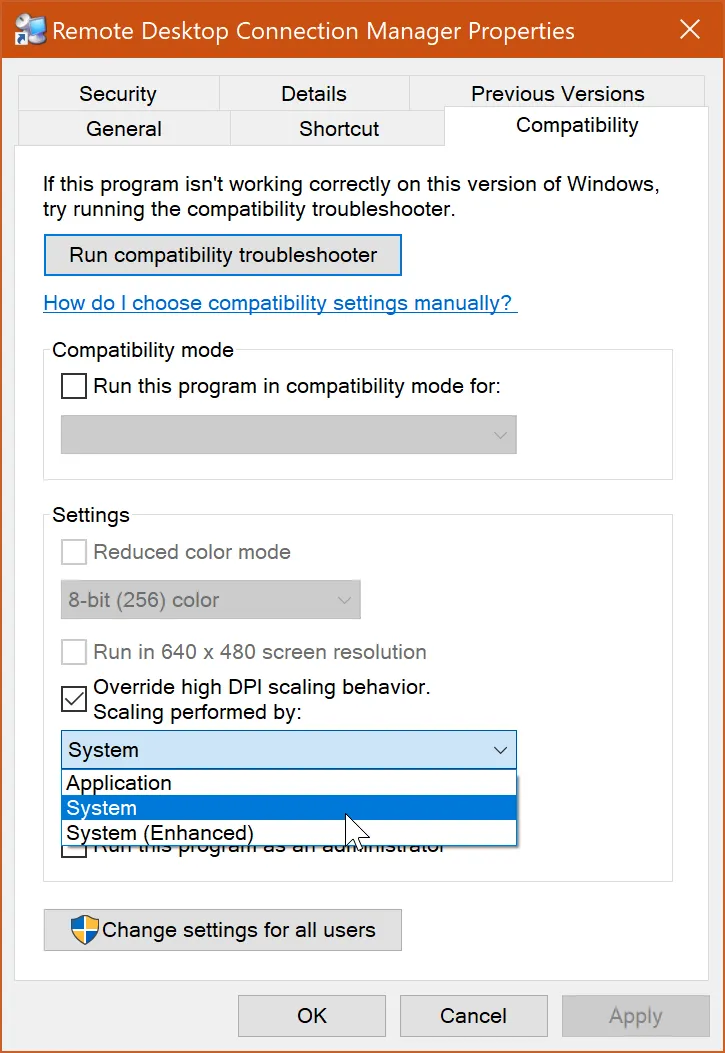
I’m rather disappointed it took me this long to figure out, but now that I have it working its fantastic and my remote sessions are no longer scaled way down to fit.
Monday, October 23, 2017 by Nate Bross
Choosing the right technologies for a project is one of the early decisions you must make and its a crucial factor in long term success. Technology choices can make a project go smoothly or they can be a constant impediment to forward progress.
Since this a just for fun build, I’m going to try to throw a bunch of things at it, but first lets start with the basic technology stack.
Front end
UWP, obviously, but more specifically the plan is to use html and javascript as the building blocks packaged up inside a UWP application. To cap things off, I figured why stop there, lets throw in typescript, to get statically typed javascript and throw in a couple front-end frameworks to boot. Aurelia, for data binding and non-gamey stuff. Phaser-CE for gamey things.
Server Side
I’m a Full Stack .NET developer in my day life, so in order to focus on the game specifics for the front end, I decided not to bite off another layer of complexity by choosing a tech stack I’m not already proficient with. With that in mind, C# service/controller layer and Razor views (that serve up the baseline for the aforementioned Aurelia framework to pickup). The plan is to host this on Azure App Services, and then to throw some new things in the mix, I’m going to try to find a way to fold in CosmosDB, Notifications Hub, and maybe even some container services.
To summarize this up into a nicely packaged list:
- Languages and Frameworks
- C# + ASP.NET Core
- Typescript + Aurelia
- Phaser-CE
- Apps and Tools
The idea is by using a lot of tooling I’m already familiar and comfortable with, I’ll be able to focus on the game specific tasks for this project.
Friday, October 6, 2017 by Nate Bross
I was setting up a new Umbraco Project, for the first time in a while. At my company, we have a base implementation that we ‘fork’ manually by copy/pasting the repository and creating a specific one for each client.
I set it up and try to run it, and immediately hit this error:
A route named 'something or other' is already in the route collection. Route names must be unique.
A good error message that describes the problem exactly, and how to fix it. My problem? I’m not defining any routes manually, and this is the same code that was working in another project. What gives? There are lots of posts explaining how to update your RouteConfig to remove the duplicate.
Eventually I come across a highly up voted post, suggesting to delete the bin files and try again. I know the bin folder is created by the compiler for my project; but deleting everything in there felt a little draconian to me. This is an axe kind of fix, and I’m thinking this is more of a scalpel problem.
One of those manual steps to creating our client specific projects, is to go in and rename folders, solution, and project files (and their internal path references to each other). This went just fine, and from a Visual Studio perspective everything linked up worked, and built.
Then it hit me. I renamed the project and its compiled output was in the bin folder along with the newly built and compiled version with my new name. Ultimately I had two copies of identical code in the bin folder with different physical file names.
I deleted the dll files from my original build with the old name, and that ultimately fixed the problem.
Thursday, October 5, 2017 by Nate Bross
Utilizing .NET Core has been a pretty great experience. There have been a few gotchas with APIs not being available in the base package. I was really stoked to see that the SqlBulkCopy classes are part of .NET Core. I was less thrilled to note that DataTable is there in .NET Core 1.0 but just an empty non-usable class.
That means converting from a generic IEnumerable<T> to a DataTable/Set is not an option.
Enter DbDataReader: another way to utilize BulkCopy.
If you have an IDataReader instance, the BulkCopy WriteToServer method has an overload to cover that; however, I’m an ORM to pull in some data form various sources so I basically have List<T>s, not IDataReaders. Searching the web it’s pretty difficult to find a generic way to convert from a generic collection to a IDataReader. Much harder than it should be.
Enter FastMember: Convert an IEnumerable<T> to a DbDataReader, fast!
This great package makes the process easy and extremely fast. Basic demo shows how simple this package makes things.
using (SqlBulkCopy bulkcopy = new SqlBulkCopy(connection)
{
    using (var reader = ObjectReader.Create(toInsert))
    {
        bulkcopy.WriteToServer(reader);
    }
    bulkcopy.Close();
}
Friday, September 1, 2017 by Nate Bross
Someone asked on Stack Overflow:
Session[“pageIndex”] this is my variable which is used in all aspx.cs pages
I used
$('#btn_click').click(function(){
sessionStorage.removeItem('pageIndex');
)};
to clear the session variable in design source file but it doesn’t works
help me thanks in advance
I posted the following answer, which was chosen as the accepted answer:
I recommend you throw the page number into the query string, then in the Page_Load event, you check for it. If its there, you go to that page directly, otherwise you load the first page.
This should support browser back button functionality taking you to the correct page.
The issue you’re experiencing is that ASP.NET is letting you change the page content without changing the url.
Notable comments
Nate (0 upvotes): @SatG_shanu I recommend that you revert the edit to your question here, and post a new question.
Originally posted on Stack Overflow — 0 upvotes (accepted answer). Licensed under CC BY-SA.
Monday, August 14, 2017 by Nate Bross
I asked this on Database Administrators:
The View
CREATE VIEW [dbo].[vProductList]
WITH SCHEMABINDING
AS

SELECT
     p.[Id]
    ,p.[Name]
    ,price.[Value] as CalculatedPrice
    ,orders.[Value] as OrdersWithThisProduct
FROM
    products as p
    INNER JOIN productMetadata as price ON p.Id = price.ProductId AND price.MetaId = 1
    INNER JOIN productMetadata as orders ON p.Id = orders.ProductId AND orders.MetaId = 2
For the sake of simplicity, assume that productMetadata has columns ProductId, MetaId, Value has ~87m rows, and there are about 400k rows in the products table.
General queries against this view work perfectly:
SELECT * FROM vProductList WHERE CalculatedPrice > 500
Query results in 2-4 seconds (over a vpn and remote, so I’m good with that).
Changing the above to a count is equally fast:
SELECT COUNT(*) from vProductList WHERE CalculatedPrice > 500
runs in about the same time as the raw select, which again I’m OK with. There are roughly 10k products meeting this criteria.
I’ve run into two separate instances where things get really odd and take FOREVER.
First
Doing a query against one of the columns from the base table in the view:
SELECT * FROM vProductList WHERE Name = 'Hammer'
This query takes a little while to run (20-30 seconds) and returns ~30k results; however, a slight change to said query:
SELECT COUNT(*) FROM vProductList WHERE Name = 'Hammer'
takes thirteen MINUTES to return a count stating ~30k .
Second
Doing a WHERE IN subquery
SELECT * FROM vProductList WHERE Id IN (SELECT ProductId FROM TableThatHasFKToProductId and ColumnInTable = 'Yes')
This query returns ~300k rows and takes two minutes to return (much of that time is simply spent downloading the data into SSMS I believe); however, changing that to a SELECT COUNT(*) results in a query that takes twenty minutes.
SELECT COUNT(*) FROM vProductList WHERE Id IN (SELECT ProductId FROM TableThatHasFKToProductId and ColumnInTable = 'Yes')
Why is it that SELECT * is faster than SELECT COUNT?
I am using the Total Execution Time provided by SSMS for all timings listed here.
Execution plans
Plan for SELECT 1 FROM v WHERE IN (...)
Plan for SELECT COUNT(0) FROM v WHERE IN (...)
Note: I tried using PasteThePlan but it kept telling my the plan was invalid xml.
Paul White answered (6 upvotes):
From the execution plans provided, for the COUNT case the optimizer chooses a local/global aggregation strategy around the final join:
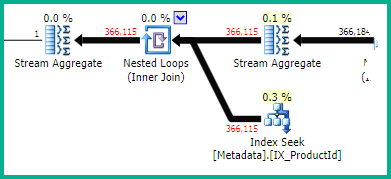
Unfortunately, the optimizer overestimates the effectiveness of the local aggregation. It estimates 136 rows driving the Nested Loops join, whereas 366,115 are encountered at runtime.
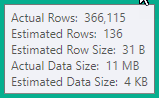
The 366,115 index lookups might not be too much of an issue for a local SQL Server instance, but the wait stats included in the plan show the I/O (and possibly memory) limitations of your current Azure SQL Database configuration:
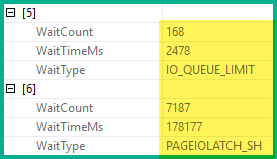
The plan for SELECT 1 shows an exclusively hash and merge join strategy, which produces better results in this case with the very limited memory and/or I/O capabilities.
You might well see better performance for the first query with an OPTION (HASH JOIN, MERGE JOIN) hint, but the fundamental issue is the poor cardinality/data distribution estimate driven by the large number of joins.
Don’t be misled by the cost percentages shown against each plan operator - these numbers are currently derived from the optimizer’s estimate of cost (using an abstract model). The numbers do not reflect runtime conditions or costs.
Large deviations between estimated and actual row counts can often lead to problems. This is especially true for an underestimate that causes the optimizer to choose a strategy that does not scale up well on a particular hardware setup.
Originally posted on Database Administrators — 11 upvotes. Licensed under CC BY-SA.
Tuesday, July 18, 2017 by Nate Bross
Someone asked on Stack Overflow:
I am trying to modernize this site. I have a report table being generated in the old style like:
Dim sTable = "<table class=""stat"">"
sTable = sTable & "<thead><tr><th colspan=20><Status Report: " & Session("ProcessYear") & "</th></tr>"
I am converting this into a Repeater, but I am at a loss as to how to include session data in the <HeaderTemplate>. I have:
<asp:Repeater id="Dashboard" runat="server">
<HeaderTemplate>
    <table class="stat">
        <thead>
            <tr><th colspan="20">Appeal Status Report: ???? </th></tr>
...
Some candidates are asp:PlaceHolder, and something like <%# ((RepeaterItem)Container.Parent.Parent).DataItem %> (see Accessing parent data in nested repeater, in the HeaderTemplate), but I’m at a loss as to what that is referencing.
Not in a position to refactor out the Session dependencies, unfortunately. Any thoughts? I’m fairly new to ASP.NET. My CodeFile for this page is in VB.NET.
I posted the following answer, which was chosen as the accepted answer and received 1 upvote:
You need to look into On Item Data Bound event, so you can do some code-behind work during binding.
You’ll want to check the item object, determine if its a header row, then access your session object.
Rough adaptation might look like:
ASPX
<asp:Repeater id="Dashboard" runat="server" OnItemDataBound="ItemDataBound">
<HeaderTemplate>
    <table class="stat">
        <thead>
            <tr>
                <th colspan="20">
                    Appeal Status Report: <asp:Label ID="YourLabel"/>
                </th>
            </tr>
        ...
    ...
...
Code Behind
void ItemDataBound(Object Sender, RepeaterItemEventArgs e)
{
    if (e.Item.ItemType == ListItemType.Header)
    {
        ((Label)e.Item.FindControl("YourLabel")).Text = Session["YourSession"];
    }
}
You can also do things with the footer, item and alternating items here as well.
Originally posted on Stack Overflow — 1 upvotes (accepted answer). Licensed under CC BY-SA.
Wednesday, July 5, 2017 by Nate Bross
Sounds simple enough, right? The blob storage account has a Uri and each part means something.
There are only three levels of hierarchy built into the system:
- Account
- Container
- Blob
Seen as:
https://[STORAGE_ACCOUNT_NAME].blob.core.windows.net/[CONTAINER-NAME]/[BLOB-NAME]
Within the Blob itself, the NAME property can be used to create additional ‘virtual’ directories, but they are just that. Virtual. This is where things get pretty powerful. Using the Storage Client libraries for .NET, the ListBlobsSegmentedAsync method allows you to have Azure filter out blobs based on prefix. The prefix filter here only applies to the Blob Name. If we look at a specific example (redacted to protect the guilty):
https://[STORAGE_ACCOUNT].blob.core.windows.net/[CONTAINER]/VirtualFolder1/2017/7/01/15/fileanme.ext
You see this whole part [VirtualFolder1/2017/07/01/15/fileanme.ext] is all the Blob Name. It just so happens to be setup by folders Year/Month/Date/Hour and because of this we can use the ListBlobsSegmentedAsync to filter based on it.
var list = await container.ListBlobsSegmentedAsync(
    "VirtualFolder1/2017/07",
    true,
    BlobListingDetails.None,
    int.MaxValue,
    null,
    null,
    null);
This would give us all files for the month of July in the year 2017, regardless of which day or hour they are listed in. Doing it this way allows me to query a much more limited set of data, meaning I have to process out fewer files locally and there is less data transfer in and out as a result.
The main caveat I’ve found is that you cannot use wildcards, so you can’t find all the blobs for July in any year without doing multiple queries. Because the container is not part of the blob name, you cannot query across containers either.
Saturday, May 27, 2017 by Nate Bross
Had two azure subscriptions along with two AppServicePlans (one each) for cost savings I wanted to combine them, but you can’t use the ‘Change AppServicePlan’ on the individual AppServices unless they’re in the same sub, resource group, and region.
Each time I tried to use the portal to move one AppServicePlan to the other subscription, I would get this error:
the subscription ‘subscription-guid’ is not registered for resource types 'microsoft.insights/webtests (centralus)'. #code: missingregistrationsfortypes#
Turns out that I had some existing web tests from the old portal that were orphaned and couldn’t be opened/read from the new portal.
Enter the commandline tool from the web portal (yes, the terminal in the web portal, its neat check it out!):
az resource list –resource-type microsoft.insights/webtests
and there I get a nice json list of the resources that were giving me trouble, along with their “id” so I was able to delete them with
az resource delete –id /subscriptions/[guid]/resourceGroups/[my-resource-group]/providers/microsoft.insights.webtests/[test-name]
Someone more in tune with the bash shell could probably link those up to double down and delete all the items returned with a single command, but I was able to do it manually as I only had a few of these troublesome resources clogging up my migration.


